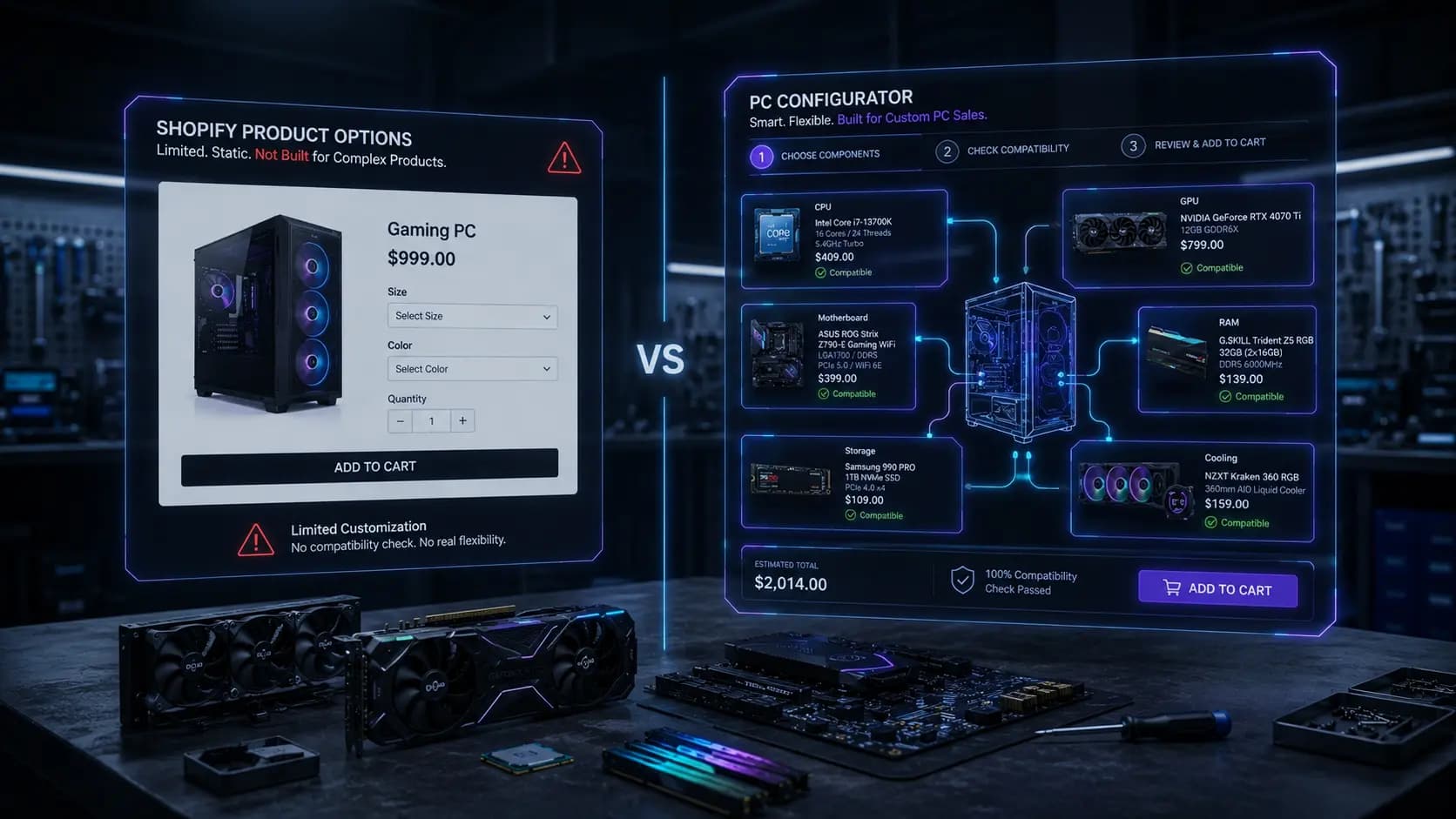
Two Very Different Ways to Sell a Customizable Product
If you sell anything customers can configure — including custom PCs — Shopify gives you exactly one native tool for it: product options, which generate variants. For most products, that's plenty. For PC builds made of six to ten independent components, it usually isn't, and the failure mode is predictable enough that it's worth understanding before you build your catalog around it.
Quick Summary: Shopify product options generate one variant per combination of choices on a single product, capped at 100 variants and 3 options per product. A PC build assembled from independent CPU, motherboard, RAM, storage, GPU, and PSU choices can represent thousands of valid combinations — far past what variants can hold — and variants have no concept of cross-product compatibility. A dedicated PC configurator keeps each component as its own product and layers guided steps and compatibility rules on top, which is what makes build-your-own-PC selling actually workable on Shopify.
How Shopify Product Options Actually Work
When you add options to a Shopify product — say, size and color — Shopify generates a variant for every combination: Small/Red, Small/Blue, Medium/Red, and so on. Each variant can have its own price, SKU, and inventory count, but they're all still the *same product*. A pair of jeans in a different size is still the same pair of jeans.
That model has two hard limits that matter a lot once you try to stretch it: a maximum of 3 options per product, and a maximum of 100 variants per product. It also has a structural limit that doesn't show up in the docs but shows up immediately in practice — variants have no relationship to *other* products. A "Red" variant of Product A has no way to know anything about Product B.
Where Variants Work Well
Variants are the right tool when a product has a small number of simple, independent choices that don't affect each other: a case in three colors, a keyboard in two switch types, a monitor in two stand options. If choosing one option never restricts or changes what's valid for another, variants are simpler than any configurator and you should use them.
Where Variants Break Down for PC Builds
A PC build isn't one product with a few options — it's six to ten *separate* purchasing decisions that all have to agree with each other. That's where the model stops fitting.
The Combinatorial Explosion
Take a modest catalog: 5 CPUs, 6 GPUs, 4 RAM kits, 5 storage options, and 4 power supplies. Multiply those out and you get 2,400 theoretical combinations — and that's before adding a case, cooler, or motherboard choice. Shopify's 100-variant ceiling isn't close to enough, so most merchants who try to force this into one product end up either drastically limiting real choice or splitting builds into dozens of near-duplicate "pre-configured" products that are a nightmare to maintain.
No Cross-Product Compatibility Logic
Even if you had unlimited variants, Shopify options have no built-in way to say "this CPU only works with these motherboards" or "this PSU isn't strong enough for that GPU." Every combination a customer can technically select is treated as equally valid, whether or not it would actually power on. That's the core gap: variants describe *choices*, not *relationships between choices*.
Inventory and Pricing Fragmentation
Because each variant combination needs its own price and stock count, a single component going out of stock (say, one RAM kit) can force you to disable dozens of variant combinations across a product, rather than just hiding one component in one step.
What a Dedicated PC Configurator Changes
A PC configurator app like Miracle PC Builder doesn't try to cram a build into one product's variant list. Instead, it keeps each component as its own independent Shopify product and adds three things Shopify options don't have:
Guided, Step-Based Selection
Instead of one page with three dropdowns, customers move through ordered steps — CPU, then motherboard, then RAM, then storage — each pulling from your real product catalog. There's no artificial cap on how many components or how many choices per step.
Compatibility Rules Between Products
Rules are attached at the product level — socket type, chipset, memory type, wattage, form factor — and applied automatically as a customer builds. An incompatible combination simply isn't offered, rather than being technically selectable and quietly wrong.
One Bundle, One Checkout
When the build is complete, every selected product and quantity is added to the Shopify cart together in a single action, then flows into native Shopify checkout — no separate cart system, no custom payment flow.
Side-by-Side Comparison
ApproachHow It Represents ChoiceHandles Cross-Component Compatibility?Practical CeilingShopify Product Options / VariantsOne product, up to 3 options, up to 100 variantsNo — every combination looks equally validBreaks down past a handful of simple, independent optionsGeneric Product-Option AppsAdds extra fields (text, swatches) to a single productNo — same single-product limitationSimilar ceiling to native variants, more flexible input types onlyDedicated PC ConfiguratorIndependent products per component, connected by guided stepsYes — rules defined once, applied to every buildScales with your catalog, not with a variant cap
When You Don't Need a Configurator
If you're selling accessories, cases, or peripherals where the "options" really are just color, size, or a single spec that doesn't interact with anything else, plain Shopify variants are simpler and you should keep using them. The moment you're combining *multiple independent products* into one purchase where the choices affect each other, that's the signal to move to a configurator instead of stretching variants further.
Frequently Asked Questions
Can I just use more than one Shopify product option app to get around the 100-variant limit?
No — stacking option apps changes how choices are captured on a single product, but it doesn't add cross-product compatibility logic, and you'll still hit practical limits once you're representing more than a handful of independent components.
Do I need to rebuild my catalog to use a PC configurator?
No. A configurator assigns your existing Shopify products to builder steps — it doesn't require duplicating products or rebuilding your catalog structure.
Is a configurator overkill for a small parts catalog?
If you sell fewer than a handful of components with no real compatibility concerns, variants are probably enough. A configurator earns its place once compatibility mistakes or variant sprawl start costing you support time or returns.
Does switching to a configurator affect Shopify checkout?
No — a build-based bundle add-to-cart still flows into native Shopify checkout. The configurator changes how customers select and combine products, not how they pay.
What happens to compatibility rules if I add new products later?
Rules are defined at the product level, so adding a new CPU or motherboard means defining its compatibility once — it then applies automatically across every existing and future build, without touching old variant combinations.