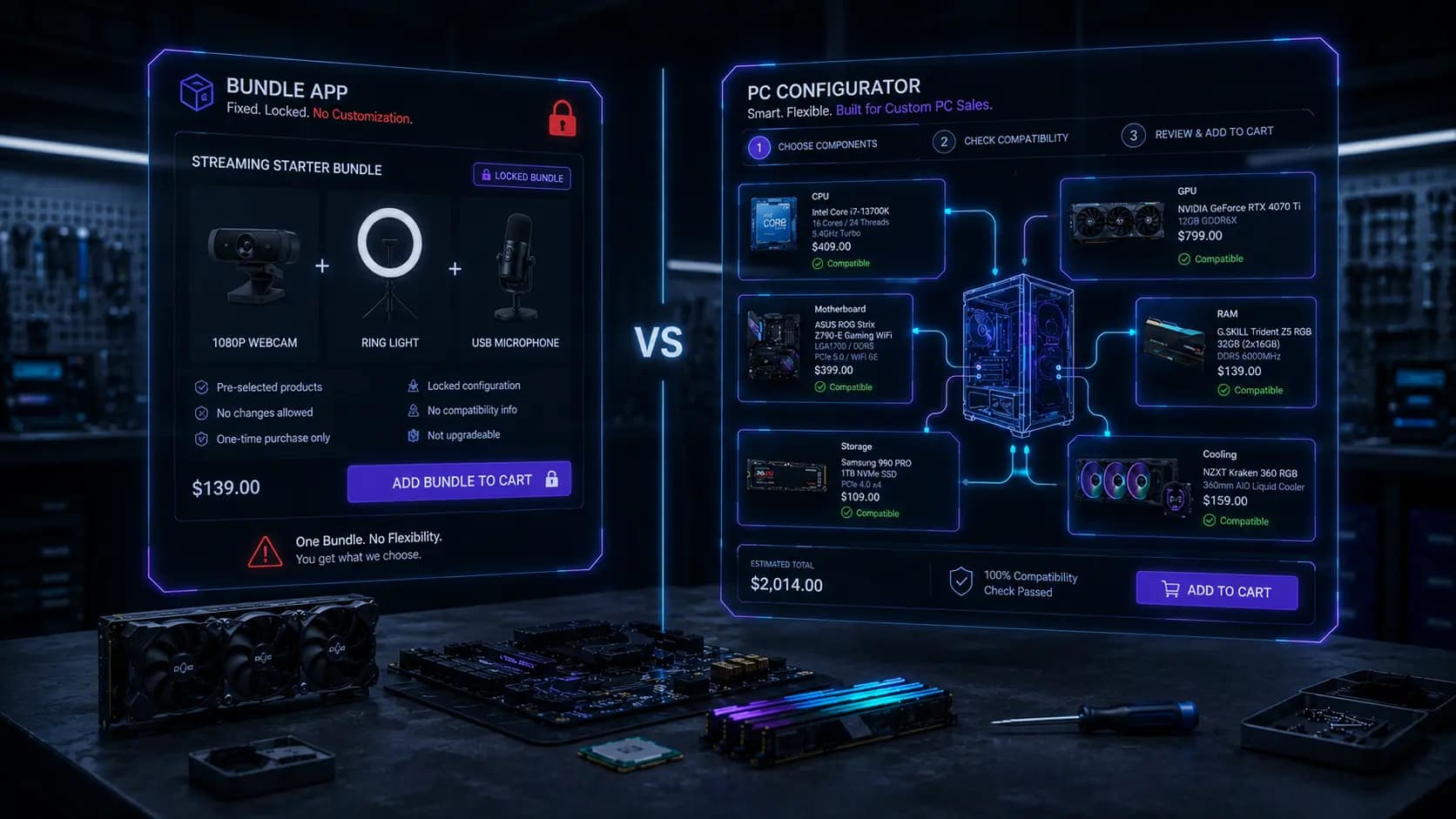
Bundle Apps vs. PC Configurators: Picking the Right Tool for Custom Builds
Quick Summary: Bundle apps are built for fixed, pre-set product kits — buy these three items together for a discount. They're simple, cheap, and effective for that job. A PC configurator is built for something different: guiding a customer through an open-ended set of choices — CPU, motherboard, RAM, storage, case — while validating that every combination is actually compatible. If your PC offering is a handful of fixed kits, a bundle app is enough. If customers need to choose and swap individual components, a bundle app will not hold up, and you need a dedicated configurator.
A lot of Shopify merchants selling PC parts or custom builds start with a bundle app because it's already familiar, cheap, and quick to set up. It works, for a while. Then customers start asking to swap one component for another, or the store adds a fourth and fifth build tier, and the cracks start to show. This guide breaks down exactly where that line is, so you don't find out the hard way after your catalog has already outgrown the tool.
What Bundle Apps Actually Do Well
Bundle apps solve one specific problem: encouraging customers to buy multiple, predetermined products together instead of one at a time. The store owner decides the grouping in advance, sets a discount, and the app handles the presentation and the discounted add-to-cart.
Fixed, Pre-Set Product Kits
A bundle app shines when the combination is decided by the merchant, not the customer. "Webcam + Ring Light + Microphone" for a streaming setup, or "Keyboard + Mouse + Mouse Pad" for a desk kit, are perfect bundle-app use cases. There's no decision tree — every customer gets the same three products, at the same discount.
Simple Discount Logic
Most bundle apps handle percentage-off or fixed-amount discounts across the bundled items cleanly, and they integrate with Shopify's cart and checkout without much configuration. For a merchant who just wants to nudge average order value up on a handful of known-good product pairings, this is genuinely the fastest and cheapest tool for the job.
Low Setup Effort
Creating a bundle usually takes minutes: pick the products, set the discount, publish. There's no rule-building, no compatibility logic, no step sequencing to configure. For stores with a small, stable catalog and only a few bundle ideas, this simplicity is a real advantage — not every store needs a full configurator.
Where Bundle Apps Break Down for PC Building
A custom PC is not a fixed kit. It's an open set of choices where almost every component has multiple compatible (and incompatible) options, and the customer — not the merchant — decides the final combination. This is exactly the shape of problem bundle apps were never designed to solve.
No Guided, Step-by-Step Selection
A bundle app shows a static group of products. It has no concept of "first pick a CPU, then see only the motherboards that fit it, then pick RAM that matches." Customers either get one fixed combination, or they're left to manually verify compatibility themselves across separate product pages — which defeats the purpose of offering a "build your PC" experience at all.
No Compatibility Validation
This is the biggest gap. A bundle app has no rule engine. It doesn't know that an AM5 CPU needs an AM5 motherboard, that a 4-slot GPU needs enough case clearance, or that a 550W PSU can't safely run a high-end graphics card. If a customer manually swaps an item in a bundle (where the app even allows that), nothing stops them from creating a build that won't power on.
Customers Can't Swap One Compatible Component for Another
Even when a bundle app supports "pick one of these three options" for a single slot, it has no way to cascade that choice into the rest of the build. Choosing a different CPU should filter the available motherboards, RAM speed options, and cooler choices — a bundle app treats every slot as independent, so the customer is on their own to figure out whether their combination still works.
Doesn't Scale Past a Few Fixed Combinations
A store with 5 CPUs, 6 GPUs, 4 RAM kits, and 5 storage options isn't offering 3 bundles — it's offering thousands of theoretically valid combinations. Bundle apps are built to manage a short list of merchant-curated groupings, not a combinatorial catalog. Trying to force that scale into a bundle app means either building an unmanageable number of static bundles, or giving up and offering only a handful of rigid presets that don't fit most customers' actual needs.
No Real Configuration State
A bundle is a single, atomic thing — either the customer buys the whole group or they don't. A PC build is a process: pick a CPU, see a running price, change your mind about storage, watch the total update, then check out with everything at once. Bundle apps have no concept of an in-progress configuration; they only know finished, pre-defined groupings.
What a Dedicated PC Configurator Adds
A configurator like Miracle PC Builder is purpose-built for the open-ended version of this problem, while still ending in the same one-click, bundle-style checkout customers expect.
Guided Steps Instead of a Flat Grid
Components are organized into an ordered sequence — CPU, motherboard, RAM, storage, case, cooling, PSU — so customers move through a build logically instead of hunting through unrelated product pages.
Real Compatibility Rules
Each product carries compatibility data — socket, chipset, memory type, wattage, form factor — and the configurator filters out invalid choices automatically as the customer builds. A customer physically cannot select an incompatible motherboard for their chosen CPU.
Flexible Component Swapping
Because every component is its own product connected by rules (not a fixed grouping), customers can swap any single component and instantly see only the options that remain compatible with everything else already chosen — something a bundle app has no mechanism for.
Still One-Click at Checkout
The end result looks the same as a bundle from the customer's perspective: every selected product and quantity added to the Shopify cart together, in one click. The difference is everything that happens before that click — the configurator does the compatibility work a bundle app simply can't.
ApproachBest FitHandles Compatibility?Handles Component Swapping?Scales to Thousands of Combinations?Bundle AppFixed, pre-set kits (e.g. desk accessory bundles)No — no rule engineLimited or noneNo — manual bundle per combinationDedicated PC ConfiguratorOpen-ended custom PC buildsYes — rule-based validationYes — cascades through remaining stepsYes — components stay independent products
So Which One Should You Use?
If your PC-related offering is a small number of fixed kits — "Streaming Setup Bundle," "Office PC Accessory Pack" — a bundle app is the right tool, and adding a configurator on top would be overkill. But the moment customers need to choose their own CPU, GPU, RAM, or storage and expect the store to guarantee those parts actually work together, you've moved into configurator territory. Trying to stretch a bundle app to cover that case usually means either an incomplete, confusing customer experience or a support inbox full of compatibility questions the app never checked.
Frequently Asked Questions
Can I use a bundle app and a PC configurator together?
Yes. Many stores use a configurator for open-ended custom builds and a separate bundle app for simple, fixed accessory kits — the two solve different problems and aren't mutually exclusive.
Will a bundle app stop a customer from picking incompatible parts?
No. Bundle apps have no compatibility rule engine. If a bundle allows any component substitution at all, it's on the customer (or the merchant's support team) to catch an incompatible combination, not the app.
Is a PC configurator more expensive to run than a bundle app?
Dedicated configurators typically involve more setup — assigning products to steps and defining compatibility rules — but that upfront work replaces the ongoing manual work of building and maintaining dozens of static bundle combinations by hand.
Do configurators still support fixed "quick build" options?
Most do. A configurator can offer preconfigured starting points alongside full customization, giving customers a fast path while still allowing changes with compatibility checked at every step.
At what catalog size does a bundle app stop being enough?
There's no fixed number, but once you're maintaining more than a handful of bundle combinations, or customers are asking to swap individual parts, that's the signal a bundle app has reached its limit for PC building.